Bank statements
One place for every bank statement: each account's year month by month, and every upload checked before it is saved.
1.The real screen, shot on a demo business.
Demo data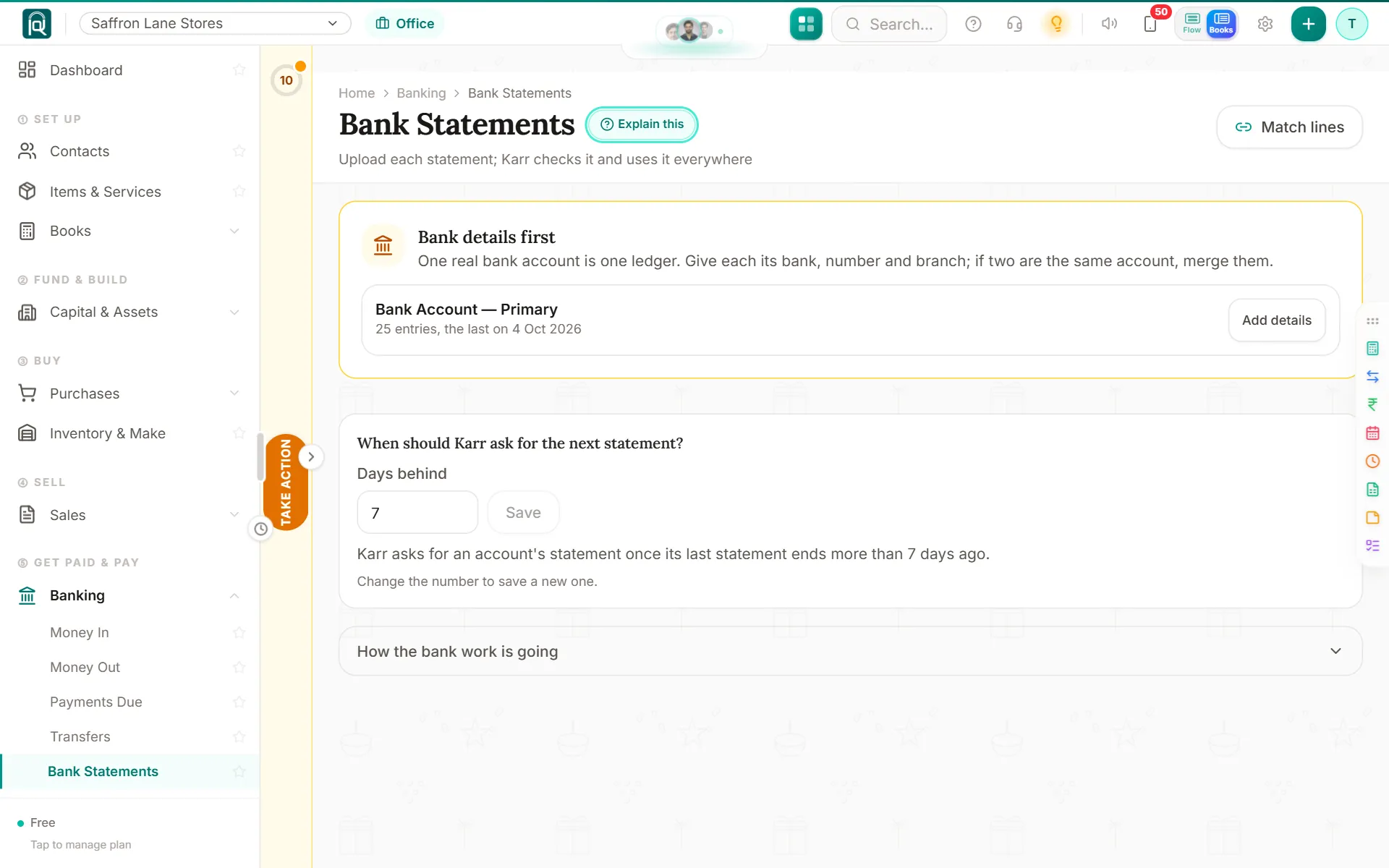
Upload the Excel or CSV your bank gives you. Karr checks four things on their own: the sums add up, it is the right account, the dates it covers, and whether its lines are matched with your books. The file is kept as your bank gave it, and a missing month is named with the day to upload from.
- Who it is for
- A business owner, an accountant or a firm
- Where it works
- Every country Karr serves (30)
Since it shipped
A bank line settles the invoices it pays
On a bank line, tick the invoices or bills it pays, of one party or several, add what they kept back, and one press settles them.
A sale missing from the books is made from its bank line
The real invoice or bill screen opens filled in from the line, and one Save records it and settles the line.
A trust tags its bank lines to a project
Each gift and payment of a trust says which project it was for, or General use; Karr keeps it for the next line.
Karr fills in the name the bank printed
J&K Bank's mobile and net-banking transfers now give their name, so an answer is offered again, and the donor field opens filled.
Karr finds the invoices a payment covers
A bank line opens with the invoices that add up to it, after tax held back or a small round-off; when two sets fit, Karr asks which.
Karr knows who paid by their bank account
After a settle Karr keeps the last four digits and IFSC on the party, so their next payment names them first.
A statement already in Karr says what to do
A statement whose lines Karr already holds now says why nothing was added, with a button to match them on Bank Reconciliation.
One side panel for every bank line
Press a line and a panel opens beside it: tie many lines to many entries, or say what it is and post it. Karr’s proposal is filled in.
A bank statement opens on its lines
One bar with the bank, its full account number, branch and IFSC, and the column headings stay in place while you scroll.
A statement in another name says so, and waits
Both names side by side. A statement in another name is saved, or its account added, only after three confirmations.
A statement's lines wait for its questions
Until whose statement it is, and where it starts, is answered, none of its lines or the Save button is on the page.
Your whole bank statement on one page
Press a bank account: every line from the first day, what each is in your books, its debit and credit, and a PDF or Excel to keep.
Each line of a statement is checked by its balance
A statement with a balance on each line but no closing figure is now checked line by line, newest line first or last.
Every row of a statement says Matching or Not matching
Statements show the oldest line first. A row whose balance does not follow is red, with its fix; missing days are asked for.
The first statement checks whose it is
Karr checks the account holder's name, locks it once, and asks when the first deposit or the date of incorporation does not fit.
The wrong statement says so, and what to upload instead
Another account's statement opens a popup: both accounts side by side, what to upload instead, and one press to save it where it belongs.
Widen a statement's columns as in Excel
Drag a heading's edge on a bank statement to widen it; the mapping column starts at a third of the width.
A bank line with no entry asks what it is
The likeliest answer first, with why; the entry and the balance after are shown before one press posts it and maps the line.
A saved statement maps itself to your books
Karr links the lines it is sure of at once, proposes the rest with Accept or Accept all, and says how many need you.
A statement Karr has not met reads itself
Karr finds the money columns by checking every balance follows from the line before, and refuses a row it cannot read, naming it.
Drop every statement at once
Drop any number of statements on Bank statements: Karr reads each account number, sends it there and saves the ready ones in one press.
Karr remembers how you answered a bank line
The same payee next month is proposed your answer, "as on" its day; nothing is recorded until you accept. Remove it under Rules.
Send a statement Karr cannot read
A statement Karr cannot read can be sent to Karr with one press, kept 30 days at most; once it reads, Act now says upload it again.
Your own AI reads a statement and proposes the lines left
With AI on for bank statements, your own AI reads a PDF Karr cannot and proposes the lines left, tagged AI. You accept each one.
Your statement, row by row, with what each line maps to
Every line and the four checks before saving; after, each row shows its entry, Karr's proposal or a question, and opens in place.
Disconnect a bank, and a reminder before it ends
A connected bank can be disconnected under More; the home asks you to renew it 15 days before it ends. Still sandbox, on demo data.
Connect a bank from Bank Statements, in sandbox
Each bank on Bank Statements can be connected to send its statement through an Account Aggregator; for now in sandbox, on demo data.
Bank accounts carry the number and IFSC from the statement
The account number and IFSC printed on your statement are on the account, so the return names the bank a refund is paid into.
A PDF statement says which balances the bank printed
A balance the reader had to work out, because the PDF did not print it, shows as unchecked rather than as the sums adding up.
Karr keeps only the statement lines
An uploaded bank statement is read into its lines and the file is not kept. Download the statement any time as a CSV.
Karr's statement template, in plain sight
Bank not read? The upload sheet now shows Karr's template as three steps: download it, copy your lines in, upload it.
One bank account, one name
Every bank account now needs its bank, number and branch, and two ledgers for the same account merge into one.
A better copy never overwrites your work
A clearer copy of a saved statement waits beside it until you compare the two; any statement downloads as Karr CSV.
Fifteen more banks read as they come
Kotak, Yes, IndusInd, PNB, Bank of Baroda, Canara, Union, IDFC First, Federal, J&K, Equitas and payments banks read as downloaded.
Karr asks for the next statement
Home asks for each bank statement once it is behind by the days you choose, and your accountant can ask for the missing months.
One place for every bank statement
Bank Statements shows each account's year month by month and checks every upload four ways before saving it.
PDF bank statements read too
Upload a PDF statement, even a locked one: Karr reads it, checks it the same four ways, and asks before using your own AI.