Reports you can trust
Profit and loss, balance sheet, cash flow and ledgers, and every figure opens the entries behind it.
1.The real screen, shot on a demo business.
Demo data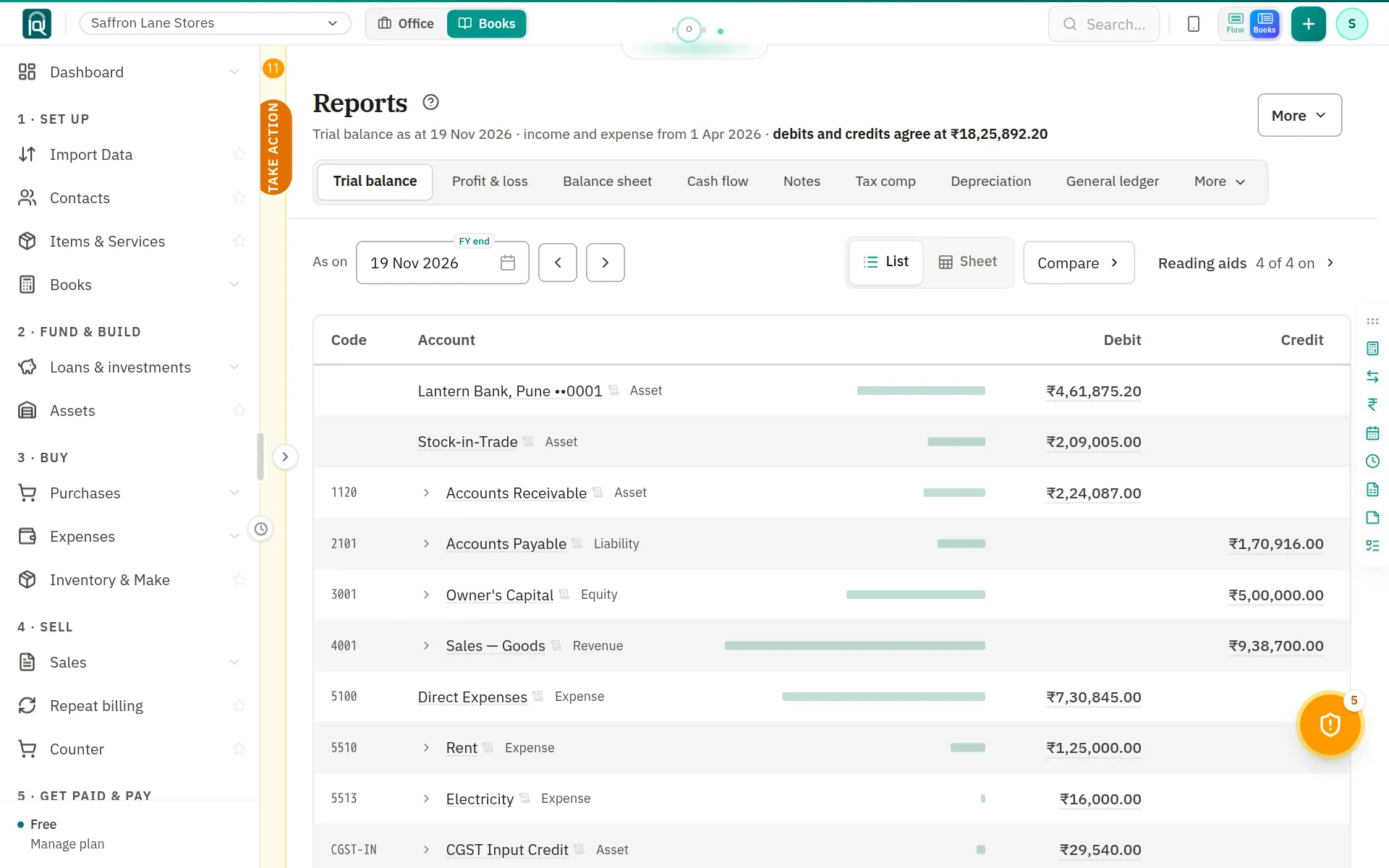
Tap any figure and see the entries that make it up, then open the one you want. Compare this year with last year side by side.
- Who it is for
- A business owner, an accountant or a firm
- Where it works
- Every country Karr serves (30)
Since it shipped
Tax comp says what is left, then the tax
One line says what is left before it is final, and tax paid or an add-back is typed in the sheet, which works out again as you type.
The header fits every laptop
On a laptop the page header keeps its tabs readable and never stacks two More buttons.
A moved line says where it went
A journal line moved to another account shows where it went, offers only what is left on it, and warns when a move was posted twice.
A nil reads as zero, and every books check has a name
A nil balance never shows a minus, every Books health check has a plain title, and short words in a list are no longer cut.
FY start and FY end sit on the date box
FY start and FY end are now a small tag on the top edge of each date box, over the year, so the date row stays short.
Reports start with the figures
The statement shows as soon as a date is picked, with its total by the title; on a phone every account shows one amount marked Dr or Cr.
Change the closing stock
Change the figure on Tax Comp fixes a closing stock we booked: only the difference is booked, on its own dates.
The General Ledger opens at the balance brought forward
Each ledger starts with its opening balance on the From date, so its running and closing balances are the real ones.
Clean bands with Compare on
With Compare on, each row name takes the shade of its own row, so the grey and white boxes behind the names are gone.
Compare years on five more reports
Notes, Tax Comp and Depreciation get a column per earlier year; the General Ledger and the Day Book get one line per year.
Compare years on party, group and client statements
A party's statement gets one line per earlier year; the group's statements and a client file's statements get a column per year.
Compared years line up with TaxBank Check on
With Compare on, every tax and bank figure stands under its own year, and a Checks beside switch gives the years the full width.
Import, tool and report tables filter by column
The Tally tie, import previews, Report Builder, Exports, AI search and shared sheets get a filter on each heading and the reading aids.
Act now asks for the missing bank statements
Act now lists each bank account with the months it has no statement for and an Upload button; accounts on file get a tick.
An amount opens its entries
Press an amount on a statement to see the entries behind it, down to the voucher.
Compare any earlier year on your reports
Tick any year your books hold under Compare: it stands beside this year for the same dates, and each figure opens its entries.
Reading aids on every statement
Party statements, ageing, Schedule III, budget variance, projections and the Day Book now carry the grey bands, row box and trace.
Reading aids on every statement
Statements have reading aids to switch: shaded lines, size bars, a row that grows when pointed at, a press on an amount showing its parts.
Statements read like a spreadsheet
A box marks the row you are on and arrow keys move it, and with TaxBank Check on a line still opens to its ledgers and entries.
TaxBank Check fits a phone
On a phone, TaxBank Check puts each check under its line, and each total with its counts on two lines.
The bank checks each statement line
With the check on, each line shows the bank, cash and party rows under one total, and asks for a missing bank statement.
The statement check is now called TaxBank Check
The switch that checks a statement against tax filings and the bank is now TaxBank Check, an add-on beside the view.
The tax check switch sits beside the statement view
The switch that checks a statement against tax filings now sits beside the statement view, on the statutory statement only.
A quarterly filer is read at the quarter end only
A quarterly filer is read at the quarter end only, and when Karr does not yet know how a business files it checks that first.
A tax refresh reads only the returns a business files
A quarterly filer is read only at quarter end, a refresh that brings back no return is not counted, and a filed month never says not filed.
Quarterly filers are checked quarter by quarter
A business that files its tax return each quarter is checked against each quarter, and Purchases leaves out opening and closing stock.
Sales and purchases print under their own heads
Sales and purchases brought in from Tally print under their own heads, never "Other", and their closing stock counts as stock.
Tax checks inside the Profit and Loss and Balance Sheet
One switch on each statement shows the tax portal's figure under every line it knows, with a tick or the difference and its fix.
Tax checks stand beside each line of the statement
With the checks on, each line shows the tax portal's figure under it and, beside the statement, a tick or the difference with its fix.
The statements keep the screen for the figures
What the year owes, unposted entries and the stock line sit in Act now; the statement keeps one line that opens them.
Balance Sheet and P&L in Tally view
Books brought in from Tally open in Tally view: its groups, each netted as Tally nets it, so the total is Tally's.
The Cash Flow starts from the cash you really had
The Cash Flow reads the opening cash and bank from the books, and every line shows which way the money went.
Tax that should not be in the books comes out in one press
Posting the year end now takes out tax booked on a non-profit, or above the computation, without waiting on anything else.
No income tax on a loss or on a charity
A Section 8 company, trust or society is never charged company tax, and an empty asset register no longer taxes a loss.
The P&L never charges more tax than the computation
When the books carry more income tax than Karr works out, the P&L takes the excess out at once and Tax Comp posts the reversal.
What the year owes, asked where it is answered
The year-end box sits above every statement and every door; while a question is open the statements wait and the door says why.
Act now posts a finished year; downloads show the position
Act now posts a finished year's entries in one press; Depreciation shows what is unposted; downloads list it at the foot.
Depreciation comes only from the fixed asset register
Depreciation now comes only from the fixed asset register, so the Profit & Loss and the depreciation schedule always agree.
Depreciation schedules follow the books for a firm
A firm or LLP gets its books schedule under AS 10, and the tab warns when the schedule does not match the Profit & Loss.
Statements show the exact position, posted or not
The P&L and Balance Sheet show the depreciation and tax Karr worked out but nobody posted, tagged Unposted; Tax Comp posts it in one press.
Depreciation schedules for the tax audit, in Excel
Reports has a Depreciation tab after Tax Comp: download the Companies Act and the Income-tax Act schedules, each in Excel.
Every tax line on the Profit & Loss opens its computation
Press any tax line on the Profit & Loss to open the full computation for that year.
Tax Comp posts the year’s depreciation
Months the asset register still owes a year are posted in one press; depreciation by journal with no register is asked about.
Tax Comp provides the audit fee
An audited year with no audit fee gets one: last year’s fee plus ten per cent in one press, or the fee the auditor agreed.
Tax Comp takes the cheaper regime and says why
Every line says why it is there, and a figure opens its source with a Back button.
Tax Comp asks what last year's return carried forward
Tax Comp shows what last year's return carried forward, says where each figure came from, and asks a company or firm to confirm it once.
Tax Comp asks what was on the shelf at year end
Tax Comp asks a trader once for the closing stock, books it with the signed stock statement, and carries it into next year.
The Profit & Loss always shows the tax
A company, LLP or firm's Profit & Loss always shows current and deferred tax, Nil as Nil with the reason, and flags profit with no tax.
Karr says when the tax no longer fits the profit
If entries change a year's profit after its tax was booked, the Profit & Loss says so above the figures and Tax Comp fixes it in one press.
The full tax computation, ready to send to a bank
Tax Comp now works the year through to the tax payable, books the provision for you, and downloads as a PDF or a spreadsheet.
Tax Comp starts from your profit before tax
Income-tax is no longer deducted as an expense, a loss shows as a loss, and every asset in the register earns its Income-tax depreciation.
FY start and FY end follow your own financial year
FY start and FY end use the year saved for the business, and Settings warns when an Indian business is set to a month other than April.
A trader's profit and loss, in the words the law uses
A shop's profit and loss shows Purchases of Stock-in-Trade, and a statement warns in amber when the books check finds a figure wrong.
Download every report at once
Reports has one Download panel with four ways out, including every report in a single file.
The Day Book, three ways
Read the Day Book as a list, as a bound book or as a sheet, one day at a time.
Balances on the side they belong
A customer who paid ahead or a supplier you paid ahead shows on its own line, on the right side of the balance sheet.
Every figure opens down to its entry
Tap a figure in any report to see the entries behind it and who made them, and move a line as an audit adjustment.