Clients, fees and the firm
Leads, engagements, fees and what each client owes the office, in one list.
1.The real screen, shot on a demo business.
Demo data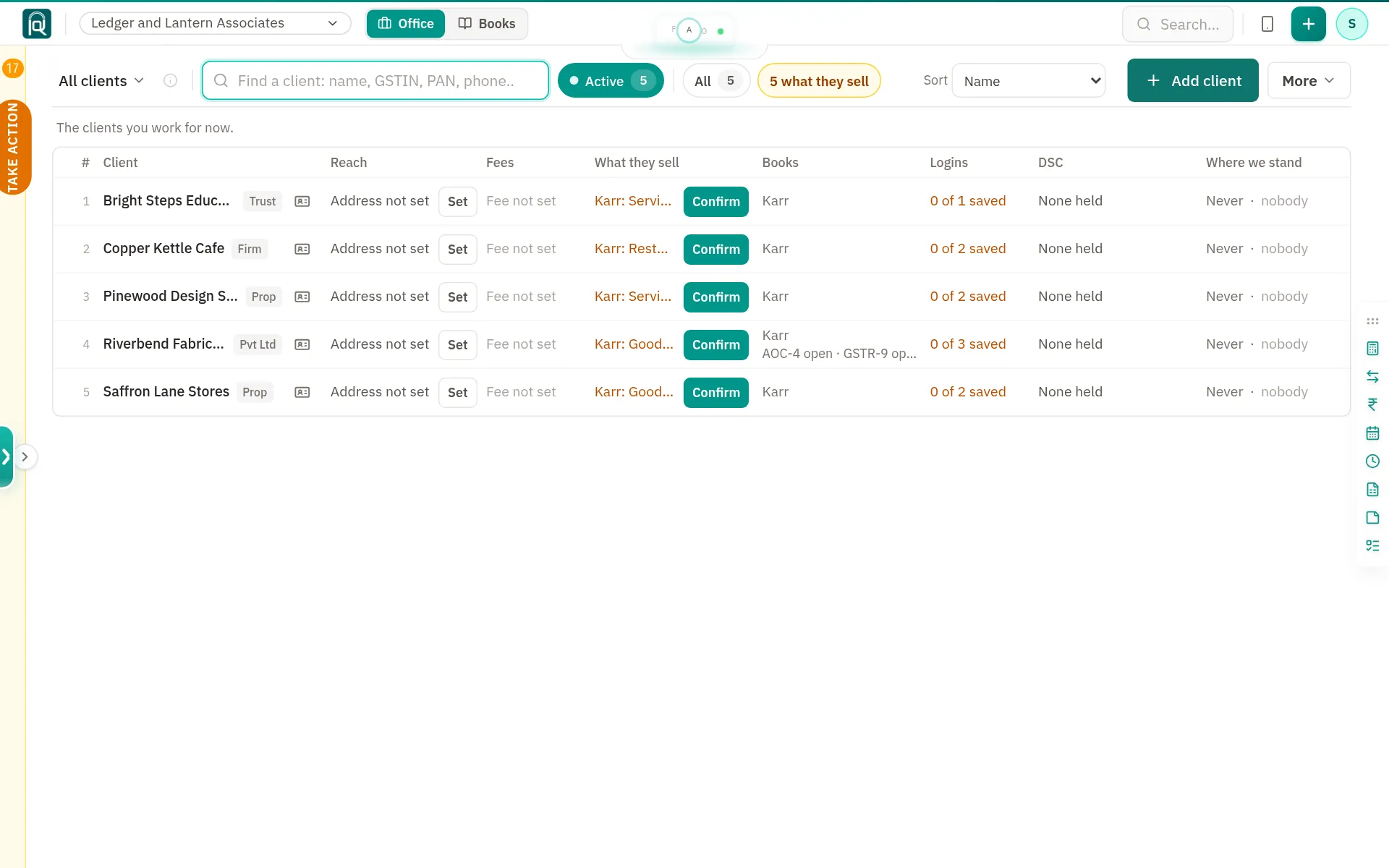
Follow a new client from the first call to the signed engagement. Fees are billed from the same place and chased like any invoice.
- Who it is for
- An accountant or a firm
- Where it works
- Every country Karr serves (30)
Since it shipped
The Office by its letters
New task on the Board has its letters, and the Office list opens its places by theirs even while it is shut.
A proposal for several people at the client
Send one proposal to up to five of the client's people, each Can accept or Copy only; the first who can accept, accepts.
A proposal stops where something is missing
Next stays off until every step is filled: a proposal with no fee due date stops on Check the details, never at Send.
Your answer sits at the end of the proposal
The name, signature and code come after the last section; Message us and Accept at the bottom take the client there.
A proposal’s Send step says it is the last step
The Send box is marked as the place the proposal goes from; a teammate’s email now warns instead of turning Send off.
Change the words on a proposal, right on the page
On Send, switch on Change the words and type over the letter, About us or a clause for this client; fees and dates stay locked.
Nothing is drawn over anything else
Earlier years on a proposal keeps every name, pinned while the years scroll; a message never sits on the button you need next.
Proposals go to the client’s person, who signs first
Send asks for the client’s person, never your own contact; on the page the client signs first, then gets the code.
A new enquiry shows on All clients without a reload
Someone who fills your campaign form shows under "From this link" with the count, and a return to the tab brings in anyone new.
Proposals use your Registered Address
A proposal now prints the Registered Address from Settings as your registered office, so Send no longer asks for it again.
Send asks for your registered office first
A company or LLP missing its legal name, number or registered office is asked for just those above Send, and Send turns on once saved.
A lead's record shows only what a lead needs
A next step can no longer be set in the past, and a lead opens on its next step, notes and history; fees and books wait till it is a client.
An Office list that explains itself
Each place in the Office list now says what you do there, and a client's row on All clients opens its sheet, DSCs included.
Every lead in Karr Office has its next step
Log a call in one tap; each lead shows its next step, red when late, its stage moves by itself, and Act now counts the follow-ups due.
Leads from your campaigns land in Karr Office
A link for each place a campaign runs: whoever fills it is a Prospect with a drafted proposal, and Campaigns counts what each link brought.
Logins and DSCs on All clients
All clients shows how many of each client's logins are saved and its DSCs with the next expiry; a press opens that part of its sheet.
Office, payroll and admin lists filter on every column
The work register, DSC, floor, attendance, payroll, partner and admin lists now have the reading aids and a filter on each heading.
The emailed PDF is your template
The PDF attached to a proposal email is now your template, page for page.
Your client signs when they accept
Accepting a proposal now asks for a signature, drawn on the whole screen or uploaded, and the signed copy is mailed from your own mailbox.
Your logo on the enquiry form, and nothing lost
The page shows your uploaded logo, keeps every answer while the privacy text is read, and names a missing answer under its box.
A proposal in three steps
A proposal is three steps now: services and fees, the details, send. What the client pays stays at the foot; Templates holds your packages.
A proposal names who it is for, and keeps its record
Send asks who a proposal is for, a withdrawal is mailed to the client, and the card shows how it was accepted and its whole trail.
A proposal reads as your own document
The page your client opens is your own document now: your colours and logo, one all-inclusive fee by head, Accept at the thumb.
A proposal's PDF is the firm's own document
The PDF a client downloads wears your logo, colours and words, one section to a page, with the fee split by head.
A proposal's PDF says what is true
The proposal PDF now names the work, prints the client's state and contact, says who accepted it and when, and carries its link.
An accepted proposal bills exactly what it says
Fees from an accepted proposal stop when its year ends, and months already gone are billed once, so the year bills what was agreed.
Edit a sent proposal and resend it on the same link
Edit and resend keeps the client's link and says what changed, and Add client tells you when a client is already on your list.
Every proposal on one list, by client and stage
Office › Clients › Proposals: each client's proposal, whether they read it, its fee for the year, and the next step on the row.
Proposals are accepted with a code from the client's email
Your client accepts with a code mailed to the address the proposal went to, and both of you get the accepted proposal by mail.
Proposals in plain words, on your firm's own paper
Each filing on a proposal now has a plain name and one plain sentence on why, and each firm keeps its own proposal paper.
Proposals say who the client contracts with, and the terms
Type your firm's legal name, number and registered office once. Every proposal prints them, with its terms, before Accept.
Proposals that are right in law
A one person company is offered its minutes book, not board meetings, and the calendar carries every date of the term.
Your proposal paper, set once in Settings
Set your proposal paper once in Settings: colours, sections and their order, your words, and the team you show on it.
A held client's handover earns your office
When a client takes over the books you held and buys a Karr plan, your office earns a share of what they pay, in its wallet.
A held client's row says what handing over saves you
A held client's row says what handing the books over saves you: what they cost you today, which stops when they buy a plan.
Adding a client asks where their books are kept
Adding a client now asks where their books are kept, and bringing a trial balance costs less than bringing every voucher.
Send a client their own figures
Send a client their own figures on a private page, from your own number.
The Board reads at a glance
Whole client names, a doer named only when it is news, one small dot of colour before a plain word, and the next 30 days first.
The Board gets the whole screen
The Board's grid now fills the screen, with each cell naming who is doing it, and its counts sit in the Act now panel at the side.
The Board starts right under the top bar
The Board's name now sits small in the grid's corner, and each column head shows the task, its date and a Run or Allot button.
The Office is one list, and the sheet gets the screen
The Office's places are one list, at the side and under each page's name; Office | Books moves between your office and your books.
Hand the books to the client
The client can take over the books you keep: they become the owner, you stay on as their Accountant, and your own sheets stay yours.
Next year in the Client file
Bring the next year: last year stays as signed, and an adjustment the client never booked is offered again.
Share a sheet with the client
Tick Show this sheet to the client on a sheet tab; once they take the books over, they read it in their own Karr.
Bring a client's books in as a trial balance
An office brings a client's books from Tally, Busy, Marg or Vyapar as a trial balance; the client's figures stay read-only.
Formulas calculate in the Client file
Formulas in the Client file now calculate, and it downloads and opens .xlsx with its formulas.
The statements in the Client file
The Client file builds the Balance Sheet, P&L, notes, cash flow and ratios from the trial balance, with last year beside them.
The trial balance and adjustments in the Client file
The Client file opens on the client's trial balance with a head per ledger; adjustments post with a reason and go back once.
A Client file that works like Excel
A Client file in Office that works like Excel: cells, formulas bar, sheets, history.
An accepted proposal lists the documents to collect
The documents a proposal asked for become the KYC step, a tick each; it ticks itself when the last is in, and one press asks for the rest.
A client's question on a proposal lands in Messages
It shows under the client, marked Proposal, and your answer goes back onto their proposal page.
A proposal names its number, contact and documents
Each proposal prints its number, who to call, their phone, the documents to collect, the hourly rate for extra work and the client's part.
A proposal never goes out with a fee of nothing
The first proposal brings Karr's list of services with fees, asks when the client started, and tells you when a client answers.
A proposal's lines are one sheet, with notes
Each service is one row: your price, this client's price, how many and how often. Important notes print first on the page and the PDF.
A year's fees can be paid in parts, each its own invoice
Half on acceptance and half by a date: the first part is invoiced when the client accepts, the card asks for the rest on its day.
An accepted proposal bills itself
When a client accepts, their fees bill on schedule in your sales, the engagement letter is made and onboarding opens on the card.
Every client message from every link, under one client
Words on a review, approval, proposal or meeting link sit in one thread per client, each marked with its link, with Open to its screen.
Send the proposal, and see the answer on the card
Send a proposal from your own email or WhatsApp; the client opens a link, accepts or asks, and the card shows where it stands.
A client you add opens straight away
Adding a client now takes the list to the stage you chose and opens their card, so a new prospect is never hidden behind another tab.
A proposal that knows what the client owes
Make a proposal from the client card: Karr lists the filings they must make and any returns not yet filed, and pre-ticks your services.
Every form now opens full size
The client record, a statement upload, the till's bill settings and floor setup open like the invoice screen: the whole screen on a phone.
Say who is responsible for each DSC
Office, DSC has a Responsible column: Us or Client. Mark Client and no renewal task, reminder or filing row about that DSC comes to you.
Office, Filings: every client in one sheet
One row per client, filing and item: why the department asks, what Karr has, the steps and the fix. Download it as Excel.
DSCs as one spreadsheet
Office > DSC is now a grid, one row per person: token, PIN, dates, days left, status, renewal start, where it is. Or one row per company.
DSCs the office keeps for companies it does not serve
A DSC the office holds for a company that is not a client now shows that company on the sheet, and why it is not a client.
One row per person on the DSC sheet
Each person is one row, with every company they are on listed in one cell, each a link. Click a person to open them in a company.
Record a DSC: pick the company, then the person
Pick the companies and their people come up to choose. Add anyone else, say how they are connected, and sign for several companies.
The DSC sheet, company by company
Every DSC field is its own column, each company with all its people under it. Click a company to open it, a person to open them.
Every DSC, where its token is, and when to renew it
Office > DSC: every DSC once per person, where its token is, and the day its renewal must start to be ready for the filing.
Every client login in one CSV
Office owners and admins can download every client's portal logins as one CSV, fill it in, and upload it back.
Your office's WhatsApp stays put in a client's books
Even in a client your office set up, the Karr Phone shows your office's chats, not a prompt to connect theirs.
The CRM is a list you search
Find a client from anywhere, see every stage on the toolbar, read fees as a register, and take back a past client.